
GC1 Joystick Purchase Guide: Buying GC1 3-Pin Joysticks
When it comes to maintaining or upgrading your wheelchair, the joystick is one of the most critical components. A reliable joystick ensures smooth control and enhances your mobility experience. Among the various options available, the GC1 3-pin joystick stands out for its compatibility and durability. As specialists in wheelchair joystick repairs and parts, we understand the importance of choosing the right joystick for your device. This guide will walk you through everything you need to know about buying GC1 3-pin joysticks, helping you make an informed decision.
Understanding the GC1 Joystick Purchase Guide
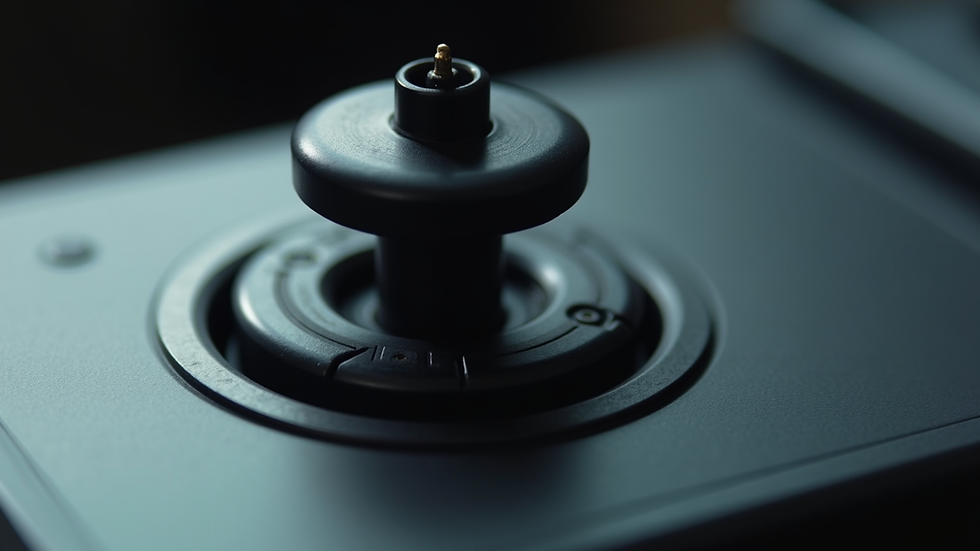
The GC1 joystick is a popular choice for many powered wheelchairs due to its simple design and ease of installation. It features a 3-pin connector, which makes it compatible with a wide range of wheelchair models, including Jazzy, Invacare, Pride, Drive, Merits, and Hoveround. Knowing the specifics of this joystick can save you time and money when it comes to repairs or replacements.
Key Features of the GC1 3-Pin Joystick
3-pin connector: Ensures easy plug-and-play installation.
Durable construction: Designed to withstand daily use.
Ergonomic design: Comfortable grip for precise control.
Compatibility: Works with many wheelchair brands and models.
Affordable: Cost-effective solution for joystick replacement.
When you need to replace your joystick, it’s essential to verify that the new part matches your wheelchair’s specifications. The GC1 joystick’s 3-pin setup is a common standard, but double-checking your wheelchair’s manual or consulting with a professional can prevent compatibility issues.
Why Choose a GC1 3-Pin Joystick?
Choosing the right joystick can be overwhelming with so many options on the market. The GC1 3-pin joystick is a trusted choice for several reasons:
Reliability and Performance
The GC1 joystick is built to last. Its robust design ensures it can handle the rigors of daily wheelchair use. Whether you are navigating indoors or outdoors, this joystick provides smooth and responsive control.
Easy Installation and Replacement
Thanks to its 3-pin connector, the GC1 joystick is straightforward to install. This feature is especially helpful if you prefer to do repairs yourself or want to minimize downtime while waiting for professional service.
Wide Compatibility
The GC1 joystick fits many popular wheelchair brands, making it a versatile option. This compatibility means you don’t have to worry about finding a joystick that matches your wheelchair’s unique wiring or control system.
Cost-Effective Solution
Compared to other joystick models, the GC1 offers excellent value. It balances quality and affordability, making it accessible for users who want a dependable joystick without breaking the bank.
If you want to buy gc1 3 pin joystick d50901, you can trust that you are getting a product designed for performance and ease of use.
How to Identify the Right GC1 Joystick for Your Wheelchair
Before purchasing a GC1 joystick, it’s crucial to identify the exact model and specifications your wheelchair requires. Here are some practical steps to help you:
1. Check Your Wheelchair Manual
Your wheelchair’s user manual often contains detailed information about compatible parts, including joystick models and connectors. Look for sections related to electronics or controls.
2. Inspect Your Current Joystick
If your current joystick is still functional, examine it closely. Look for labels, part numbers, or connector types. The GC1 joystick typically has a 3-pin connector, but verifying the exact pin configuration is essential.
3. Consult a Professional Technician
If you’re unsure about compatibility, reach out to a wheelchair repair specialist. They can help you identify the correct joystick and ensure it matches your wheelchair’s control system.
4. Consider Your Usage Needs
Think about how you use your wheelchair daily. If you require a joystick with specific ergonomic features or durability for outdoor use, make sure the GC1 joystick meets those needs.
5. Verify Warranty and Support
When buying a joystick, check if the seller offers warranty and after-sales support. This can be invaluable if you encounter any issues after installation.

Installation Tips for GC1 3-Pin Joysticks
Installing a GC1 joystick is generally straightforward, but following these tips can help ensure a smooth process:
Safety First
Turn off your wheelchair and disconnect the battery before starting any repairs.
Work in a clean, well-lit area to avoid losing small parts.
Gather Necessary Tools
Small screwdriver set
Wire cutters/strippers (if needed)
Multimeter (optional for testing connections)
Step-by-Step Installation
Remove the old joystick: Unscrew and disconnect the existing joystick carefully.
Inspect wiring: Check the wiring harness for any damage or corrosion.
Connect the new joystick: Plug the GC1 joystick’s 3-pin connector into the wheelchair’s control module.
Secure the joystick: Screw the joystick firmly into place without overtightening.
Test functionality: Reconnect the battery and turn on the wheelchair. Test all joystick directions to ensure proper response.
Troubleshooting Common Issues
If the joystick does not respond, double-check the connector pins for proper seating.
Use a multimeter to test continuity if you suspect wiring problems.
Contact a professional if you encounter persistent issues.
Maintaining Your GC1 Joystick for Longevity
Proper maintenance can extend the life of your GC1 joystick and keep your wheelchair running smoothly. Here are some practical maintenance tips:
Keep It Clean
Wipe the joystick regularly with a damp cloth to remove dust and dirt.
Avoid using harsh chemicals that could damage the joystick’s surface.
Protect from Moisture
Avoid exposing the joystick to rain or excessive moisture.
If the joystick gets wet, dry it immediately to prevent corrosion.
Regular Inspections
Periodically check the joystick for signs of wear or damage.
Inspect the connector pins for corrosion or bending.
Professional Servicing
Schedule regular check-ups with a wheelchair repair specialist.
Promptly address any joystick issues to avoid further damage.
By following these maintenance tips, you can ensure your GC1 joystick remains reliable and responsive for years to come.
Why Choose Us for Your Joystick Needs?
At JoystickRepair, we specialize in repairing and servicing wheelchair joysticks and electronics. We understand the importance of having a dependable joystick for your mobility device. Here’s why we are your best choice:
Wide selection: We sell a variety of wheelchair joysticks and modules compatible with many brands.
Expertise: Our technicians have extensive experience servicing Jazzy, Invacare, Pride, Drive, Merits, Hoveround, and other wheelchairs.
Fast turnaround: We aim to get your joystick repaired or replaced quickly to minimize your downtime.
Customer support: We provide guidance and support throughout your purchase and repair process.
If you need to replace or repair your joystick, we are here to help you find the right GC1 3-pin joystick and ensure it works perfectly with your wheelchair.
Choosing the right joystick is essential for maintaining your wheelchair’s performance and your independence. The GC1 3-pin joystick offers a reliable, compatible, and affordable solution for many wheelchair users. By understanding its features, installation process, and maintenance needs, you can keep your mobility device running smoothly. For quality parts and expert service, trust JoystickRepair to support your wheelchair joystick needs.


Comments